jco-filter
Description
With the jco-filter shortcode you can display a sortable table with the result of a Jira JQL filter. The filter table requires an active license.
Examples and Outputs
[jco-filter host="317" jql="project = EX ORDER BY created DESC" fields="issuetype,priority,key,summary,status" showcount="true" maxresults="8"]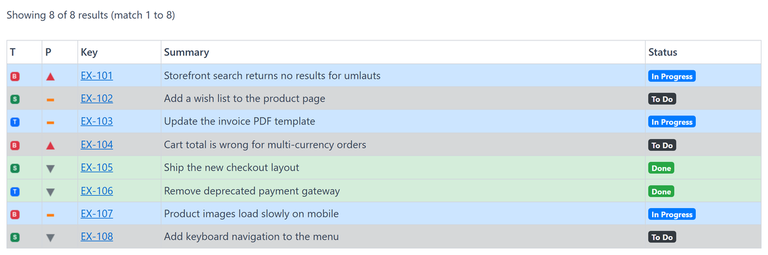
Format
[jco-filter parameter="value" ...]| Parameter | Description | Default |
|---|---|---|
| debug | If set to 1 or true, print the raw Jira response below the table. Only visible to administrators. |
false |
| fields | A comma separated list of Jira fields to display. The following fields are supported:
If you did not yet specify default fields in the plugin options, you must use this parameter. Otherwise the table will be empty. |
no value |
| headers | A comma separated list of the column headers to display. If you use this optional parameter, it should contain as many entries as the fields= parameter. If omitted, the field names are used as column headers. | no value |
| host | * Mandatory. The post ID of the Jira host |
no value |
| jql | * Mandatory. The JQL query you want to run on the host. Custom field IDs can be written as |
no value |
| linktojira | If set to 1 or true, link the issue keys to the issues in Jira. Overwrites the global setting. | global setting |
| maxresults | How many results (matching issues) to display. | 50 |
| showcount | Show a count of the query result above the table. Example Showing 20 of 7650 results (match 1 to 20) In the above example, 20 is the number of results and 1 is the first result number. |
false |
| startat | Which result is the first to show. 0 is the first result. If you want to start at the 51st result, set this to 50. | 0 |
If you do not want to provide the fields parameter on every shortcode, you can define the default fields on the Issue Filter tab.
If you provide the fields parameter, none of the default fields are shown. In that case you need to specify all the fields you want to see.
Custom Fields
Custom fields can be added to your jql= parameter in the format of:
cf{{1234}}
The above example is translated by the Lewe Jira Connector into cf[1234] which is the correct JQL format.
In the fields= parameter you must use the format customfield_1234 to add the column to the output.
Jira only delivers back the value of your custom field, not its name in your Jira instance. If you want your column to have a speaking name, you can add one via the headers= parameter.
Let's say you have a custom field "Customer" in your Jira instance with ID 1234. The following shortcode would display the field with a proper column header:
[jco-filter host="398" jql="project=ADMIN AND resolution=unresolved AND cf{{1234}} = ACME" fields="issuetype,priority,key,summary,status,customfield_1234" showcount="true" headers="T,P,Key,Summary,Status,Customer"]Gutenberg Block
The block editor offers the same table as the Jira Filter block. See Gutenberg Blocks.