Group Edit
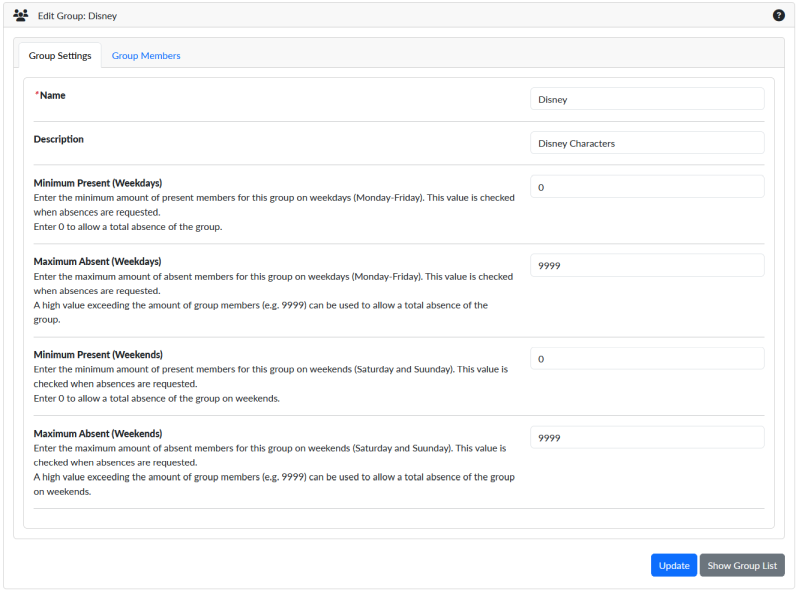
Besides setting a name and description, the Group Edit page also allows you to set thresholds for the “minimum presence” and “maximum absence” for their members. Since version 3.2.1 those values can be specified for weekdays (Monday-Friday) and weekends (Saturday and Sunday).
Group Members Tab — Manager/Member Listbox Behaviour
The Managers and Members listboxes are mutually exclusive: a user can appear in only one at a time. The following rules are enforced automatically via JavaScript as the user makes selections, before the form is saved.
Managers listbox
| Action | Effect on Members listbox |
|---|---|
| User added to Managers | User is deselected from Members |
| User removed from Managers | User is auto-selected in Members |
The second rule ensures that a former manager retains group membership and is not accidentally removed from the group entirely.
Members listbox
| Action | Effect on Managers listbox |
|---|---|
| User added to Members (who is currently a Manager) | User is deselected from Managers |
Notes
- All changes take effect immediately in the UI on selection, before the Update button is clicked.
- A user who is neither selected as a member nor as a manager will have no group affiliation once the form is saved.
- The admin user's role assignments follow the same rules in the UI, but server-side access controls apply independently of group membership.
Buttons
| Button | Description |
|---|---|
| Update | Save your current settings of the group |
| Show Group List | Goes back to the group list |