Audit Log
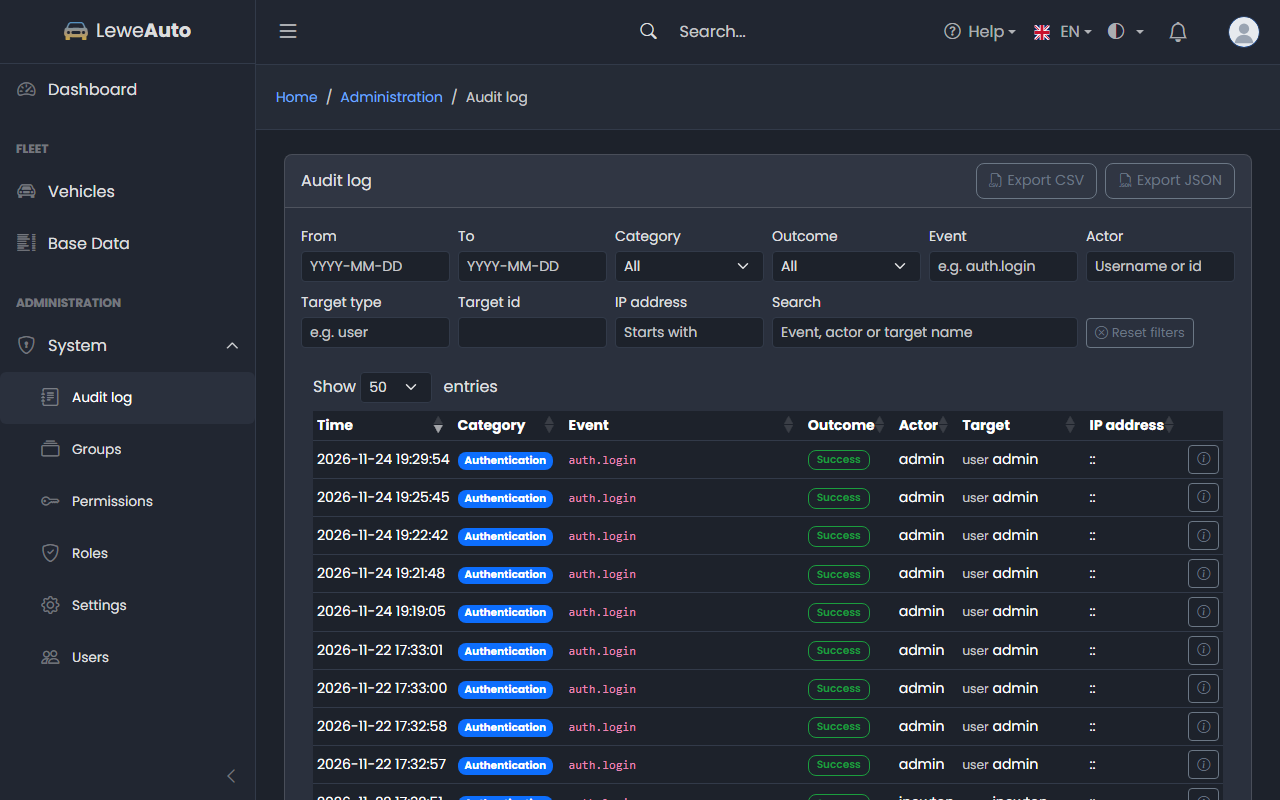
Administration → System → Audit Log is the security record of the installation. Open it with view_audit_log; the Administrator role has it.
What is recorded
Every security-relevant change is written with time, actor, category, event name, outcome, target, IP address, browser and request id. Categories include:
- Authentication - logins, logouts, failed logins, password resets and two-factor changes
- Users - account creation, edits, deletions and password changes
- Configuration - settings and branding changes
- Data - vehicle, event, document and base-data changes
- Security - permissions, roles, groups and assignments
- Audit log - exports
- Email - notification and delivery events
- Other - events that do not fit the categories above
Entries store before and after values where it makes sense. Passwords, secrets, tokens and two-factor data are masked as ***.
Filter and inspect
Use the filters above the table:
- From / To - inclusive date range
- Category and Outcome - success or failure
- Event - exact event name such as
auth.login - Actor - username or user id
- Target type / id - the affected object
- IP address - matches the start of the address
- Search - free text across event, actor and target
Click a row to open the entry. The modal shows the full details, the request id and a field-by-field comparison of old and new values.
Export
Export CSV and Export JSON download every entry that matches the current filters, without paging. CSV uses UTF-8 with a byte order mark and protects spreadsheet cells from formula injection with a leading apostrophe. Exporting is itself recorded as an audit event.
Retention and availability
The retention period is set in Settings → Security. Older entries are removed automatically.
In the limited license mode the audit log cannot be viewed; entries are still written and become visible again after a valid license is activated. See License.
The audit log can contain personal data such as usernames, email addresses, IP addresses and browser details. Export it only for a legitimate purpose, store it securely and delete it when it is no longer needed.