Users
Administration → System → Users manages the accounts of the installation. Open it with the manage_users permission; the built-in Administrator role always has it.
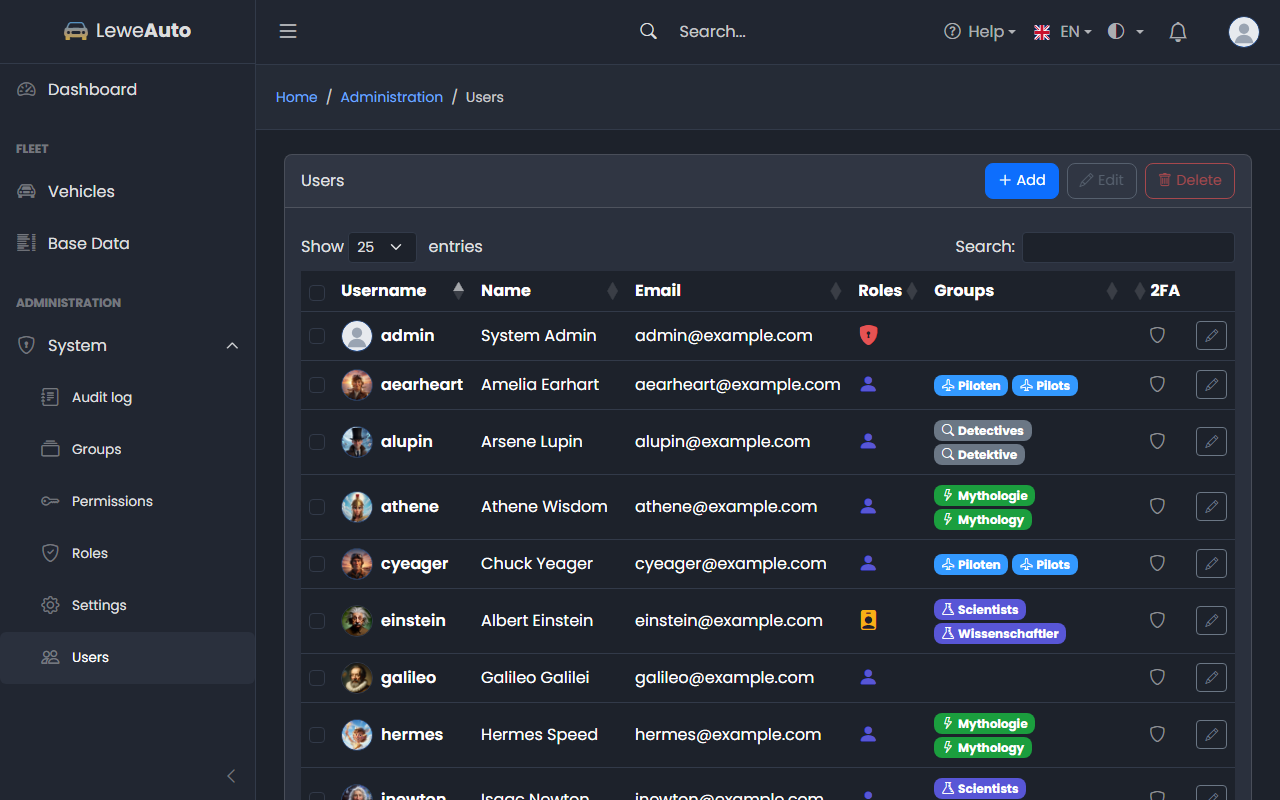
The user list
The list shows the username, name, email, roles, groups and whether two-factor authentication is enabled. Use the search field to filter by name, username or email. Select rows to delete several accounts at once, or use the row actions to edit an account.
The Add user button opens the account form. The edit form has two tabs: Account and Avatar.
Create an account
| Field | Rule |
|---|---|
| Username | 3-50 characters: letters, digits, underscore, dot and hyphen. Unique and cannot be changed. |
| Valid address, at most 100 characters, unique. Used for notification email. | |
| First name | Optional, at most 50 characters. |
| Last name | Optional, at most 50 characters. |
| Password | At least 8 characters. Not used for accounts that authenticate through LDAP or OIDC. |
| Roles | One or more roles. The roles supply permissions. |
| Groups | Optional. Groups add permissions and vehicle access. |
The account receives an Account created email when mail is configured. For an account that authenticates through LDAP or OIDC, LeweAuto stores no local password and the form explains which external method is used.
The username of an LDAP or OIDC account must match the external identity. LDAP uses the configured LDAP_USER_ATTR (for example uid or sAMAccountName); OIDC uses the preferred_username claim. Create the account in LeweAuto first; nothing is imported automatically.
Edit an account
The Account tab changes the email, name, roles, groups and, for local accounts, the password. Leave the password field empty to keep the current password. Changing a password sends a Password was changed email and invalidates the user's other sessions.
The Avatar tab sets the image shown in the header. You can pick one of the bundled avatars or upload a square PNG, JPG, GIF or WEBP file up to 1 MB. Uploads are refused in the limited license mode.
Administrators can reset a user's second factor from the account form. The user has to set it up again on the next login. See Two Factor Authentication.
Delete an account
Deleting an account anonymises it. The username and email are replaced, personal fields and avatars are cleared, the password becomes unusable and active sessions and reset tokens are removed. The user's vehicles and events are kept.
- The built-in
adminaccount cannot be deleted. - You cannot delete your own account.
- At least one user must keep the Administrator role.
Deletion is recorded in the Audit Log.
Authentication methods
The authentication method follows the configuration, not the account:
- Local: username and password from the LeweAuto database
- LDAP: directory authentication for every user except
admin - OIDC: single sign-on for every user except
admin
The admin account always authenticates locally so that an administrator can still sign in when the external provider is unavailable. See LDAP Authentication and OIDC Authentication.