List Vehicles
Vehicles in the sidebar shows the fleet you may access.
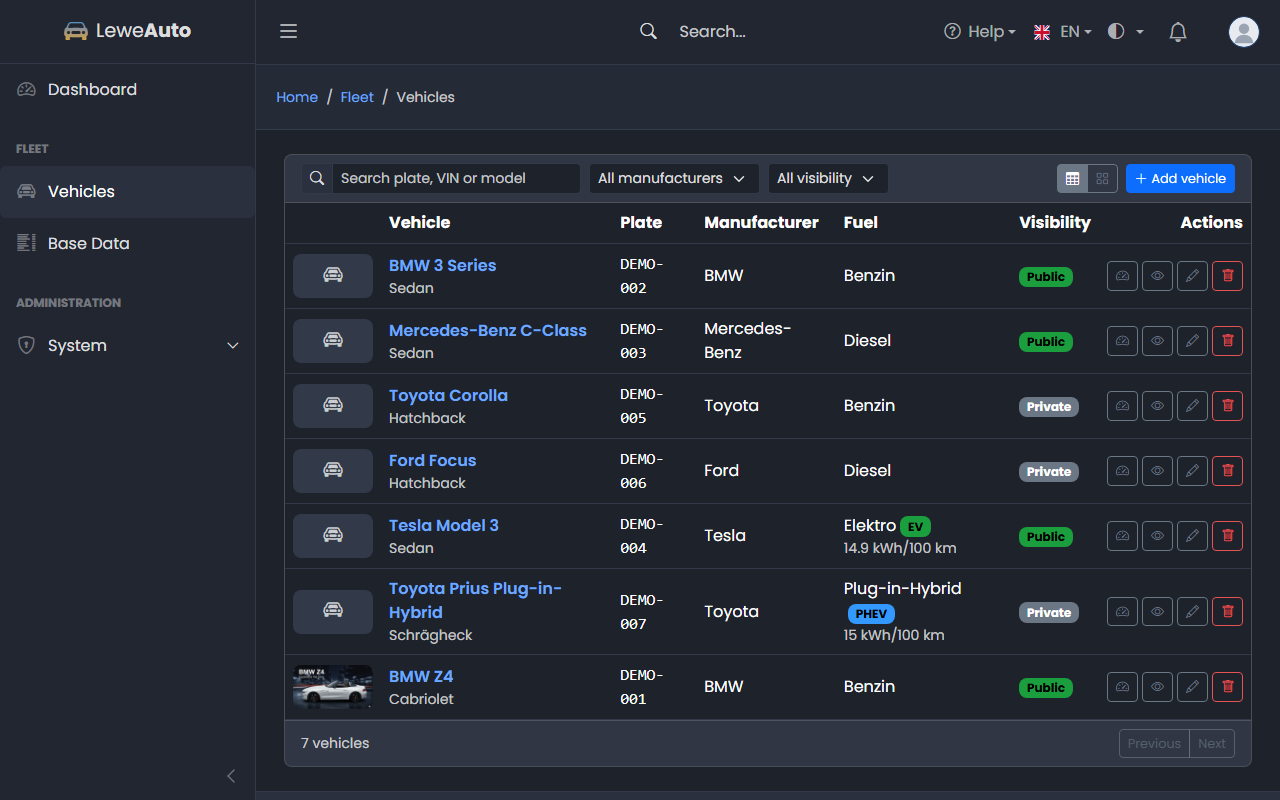
Search and filter
| Control | Matches |
|---|---|
| Search | Plate, VIN or model (case-insensitive; starts searching as you type) |
| Manufacturer | One manufacturer from the base data |
| Visibility | Public or Private |
The list refreshes immediately when you type or change a filter. Add vehicle is only shown with create_vehicle.
Table and card view
Use the two buttons at the right of the toolbar to switch between:
- Table - image, vehicle, plate, manufacturer, fuel and EV/PHEV badge, visibility, actions
- Cards - a compact tile per vehicle with image, plate, visibility and fuel
The choice is not stored; the page opens in table view.
Pagination
The footer shows the number of vehicles that match the filters. Previous and Next move through the pages of 20 vehicles. The buttons are disabled at the ends.
Row actions
| Action | Effect |
|---|---|
| Vehicle name | Opens the vehicle dashboard |
| Dashboard icon | Opens the vehicle dashboard directly |
| Open | Opens the vehicle detail page |
| Delete | Deletes the vehicle and its events (requires delete_vehicle) |
Deleting asks for confirmation and cannot be undone. Documents that are no longer used by any vehicle are removed with it.
Search by VIN when the plate is unknown or when several vehicles share a model name. The search covers the VIN as well as the plate and model.