Comments
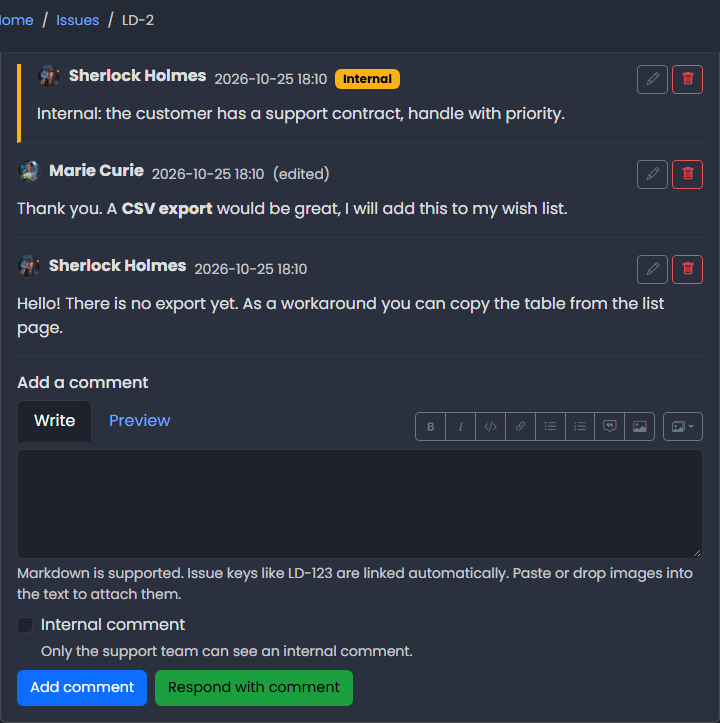
Comments are the conversation about an issue.
Adding a comment
Scroll to Add a comment at the bottom of the issue and write your text. Comments support Markdown. You can paste or drag images into the text (see Attachments). Below the text field there are up to two buttons:
| Button | Effect |
|---|---|
| Add comment | Adds the comment. The status of the issue does not change. |
| Respond with comment | Adds the comment and changes the status to show who is expected to answer next (see below). |
Respond with comment
Respond with comment is only shown when it makes sense:
- The reporter sees it when the issue is Waiting for customer. Responding sets the status to Waiting for agent.
- Agents and Administrators see it when the issue is Waiting for agent. Responding sets the status to Waiting for customer.
It is hidden while Internal comment is ticked, because an internal comment never changes the status.
It does the same as Actions → Respond (see Issue Actions), without opening a dialog.
Who may comment:
- Users: their own issues and Public and Registered issues
- Agents and Administrators: all issues
- Nobody can comment on a closed or deleted issue. Reopen it first.
- Visitors who are not logged in see a hint to log in.
Internal comments
Agents and Administrators can tick Internal comment. Only the support team can see an internal comment, and it does not change the status or trigger customer notifications. Internal comments are marked Internal.
Order
Use Newest first / Oldest first above the list to change the order. LeweDesk remembers your choice. The default is newest first.
Editing and deleting
Each comment has Edit and Delete links.
- You can edit and delete your own comments. Agents and Administrators can edit and delete everybody's comments.
- A reporter can no longer edit or delete comments once the issue is Resolved or Closed.
- An edited comment shows an edited marker with the date.
- A deleted comment is replaced by the note Comment deleted.
LeweDesk limits how many comments a user can add per hour (default 30) to protect against spam. Agents and Administrators are not limited.