SLA
An SLA (service level agreement) sets how fast an issue must get a first response and be resolved. LeweDesk measures this for each issue, shows how much time is left, warns before a target is missed and records breaches for the SLA report. Administrators set the targets in SLA Policies.
SLA data is for the support team. You see it if you have the permission view_sla (Agents and Administrators have it by default). Reporters and visitors see nothing about SLA.
The SLA panel

The panel Service level (SLA) on the issue detail page shows one line per metric, First response and Resolution:
| Part | Meaning |
|---|---|
| State | A badge with an icon: green On track, amber At risk, red Breached, grey Paused, a check mark for Met |
| Due | The due time, in your time zone and language |
| Time left | For example due in 2 h 15 min or overdue by 31 min. It is counted against the due time on the wall clock and updates every 30 seconds. The page changes to Breached by itself when the time runs out. |
| Policy and target | The policy that applies and its target |
- A timer that is paused (the issue has a status that stops the clock) shows the working time that is left and clock stopped.
- A timer that is met shows when it was met and whether it was in time or late by some time.
- A timer whose due time was changed by hand shows Due time changed by hand.
The panel is hidden when the issue has no timers, for example because it was created before a policy was active or no policy has a target for it.
Change the due time
Users with the permission manage_sla see the button Change due time next to a running timer. Use it when you agree a different deadline with the customer.
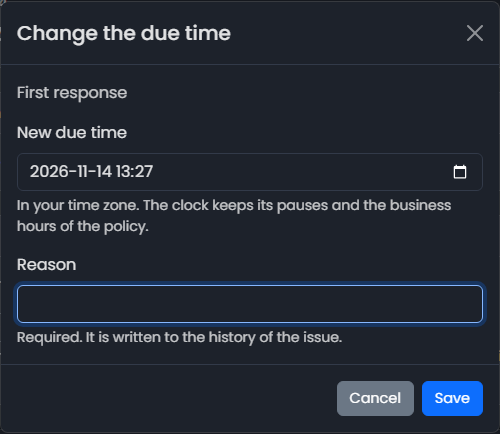
- Click Change due time.
- Enter the New due time in your time zone.
- Enter a Reason (required, one line, up to 255 characters).
- Click Save.
LeweDesk stores the new due time as a target in working time. The pauses and the opening hours of the policy still apply. The reason is written to the internal history of the issue and to the Audit Log. A timer that is met, paused or cancelled cannot be changed.
What counts as a response
The clock of the first response stops with the first public comment of an agent who is not the reporter. These do not count:
- internal comments
- comments of the reporter
- a comment of the agent who created the issue on behalf of a customer
- a change of status or assignee without a comment
A reply by email counts like a comment in the application. When an issue is resolved before a first response was given, the first response is met as well.
The clock of the resolution stops when the issue enters a status of the category Done. Reopening the issue starts a new resolution timer with the full target. The earlier result and breach stay on record.
SLA in the issue list
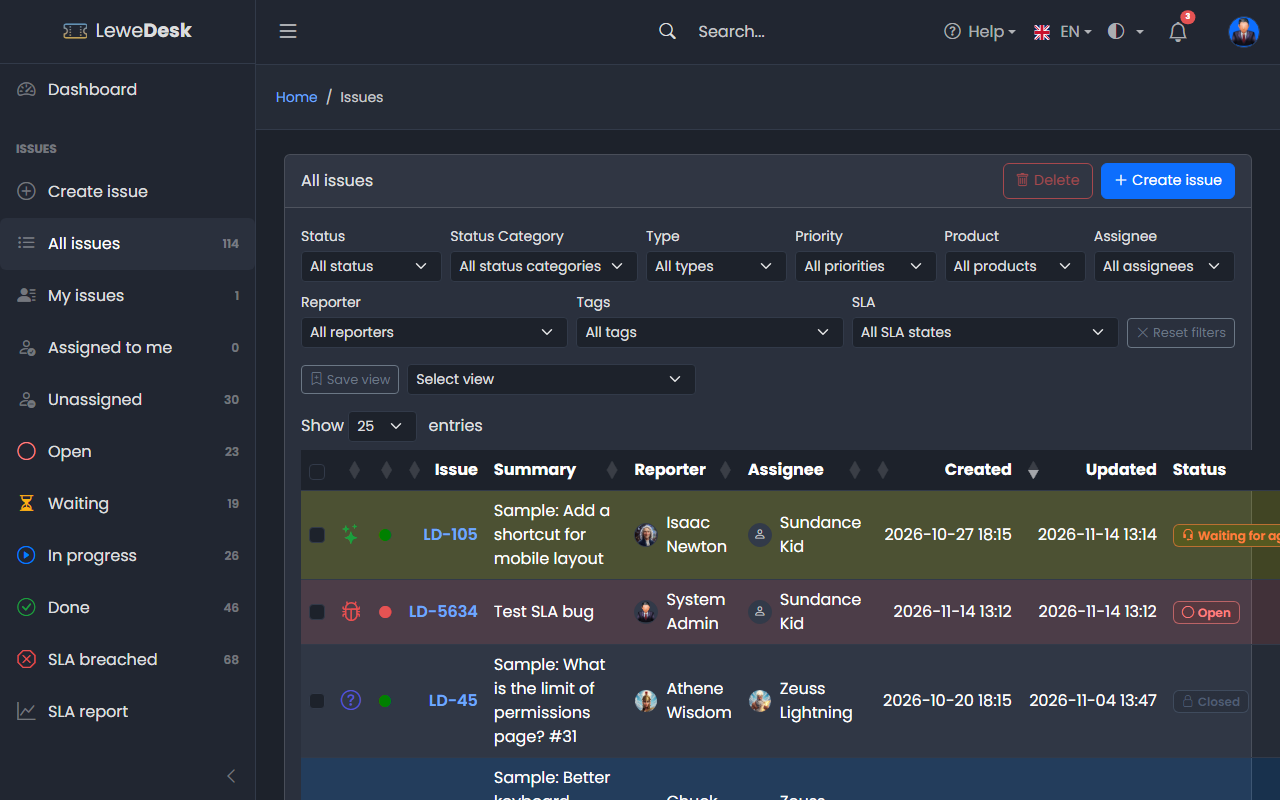
- The column SLA shows the most urgent open timer of each issue: breached, at risk, on track or paused, with the earliest due time first. A check mark means all timers are met. Issues without timers show nothing.
- The filter SLA accepts several states: Breached, At risk, Due today, On track and Paused. An issue matches when any of its open timers is in one of the chosen states. The chosen states are part of the address of the page (
sla_state=breached,at_risk) and of a custom view. - Click the header of the column SLA to sort by the earliest due time. Issues without an open timer come last in both directions.
- The quick view SLA breached in the sidebar lists all issues with a breached timer. The number shows how many there are.
Notifications
LeweDesk tells the assignee and the watchers when a timer becomes at risk and when it is breached, once per timer, in the application and by email. For a breach the escalation user and group of the policy are told as well. You can switch both events on or off per channel in your notification settings. Messages can be up to five minutes late.